Showing posts with label assignment. Show all posts

Wednesday, 10 December 2014

Semester 4 Grades

Hi everyone,

Grades have been emailed out today and here's how they stand this semester...


I will admit that these are not my best so far; they aren't the worst but there is some serious improvement to be made and some dedication and commitment to happen next year.

Stay tuned,

Miss Tracy xx 

Sunday, 14 September 2014

My Early Childhood Educational Philosophy

Hi!

Last semester, I had to complete on of the most difficult and thought provoking assignments to date: to put into words my early childhood educational philosophy.

It took a lot of thought and reflection, something which I continue to struggle with, but in the end, I managed to get it into words. I took some inspiration from my previous placement centres and looked online to see others and even took to academic literature.

This was my final piece of writing...

I believe that quality child care and education begins with the involvement and input of parents and families. Since you are your child’s first teacher, your experiences together and observations are crucial to structuring a program which caters to your child’s interests and developmental needs as they journey through childhood.
The continued observation, documentation of your child coupled with communication and continuity between the home and educational environment allows us as early childhood educators to build a program which meets individual needs, focuses on natural and authentic play spaces and fosters free choice and quality interactions. 
It is important to understand the level of diversity present in our current community and to past these views on to our future generation. To ensure this, all children are treated equally regardless of gender, race, ability, religion, socio economic status or family structure and it is expected that this is extended to their families. As a result of this, a non-gendered approach is taken by all educators when planning and programming environments and experiences.

Learning experiences are informed by the interests and needs of children in the room, observed through documentation. These aim to nurture curiosity, wonder, inquiry, as well as feeling of success, empowerment and confidence. Careful care and consideration is taken when setting these up to ensure the safety of the environment for the children it is designed for while still providing a setting for potential challenge and growth.

The social context of the environment is important to the experience of childhood and is reflected as such in the organisational structure of the rooms at the centre. Children are primarily placed based on their age, in order to provide age and developmentally appropriate experiences however the difference of ages allows for a range of interactions and a chance for cooperative and collaborative skills to emerge and be practiced.

These considerations applied to the environments and experiences designed are informed by the Early Years Learning Framework to ensure that children have the opportunity to:
·         Build a strong sense of identity
·         Connect with and contribute to their world
·         Develop a strong sense of well-being
·         Become confident and involved learners
·         Transition to effective communicators 
While the mark is important, for me this assignment was really setting me up to think about what I value, what I think was important to my approach and what informs my practice. It has set me up be a more reflective practitioner as I am continually told to change this statement and update when necessary.

I'm interested to see how many other teachers put these philosophies into writing, would you consider yourself on of them?

Miss Tracy xx 

Wednesday, 23 July 2014

Semester 3 Grades

Hello readers,

It's that time again! My results have been emailed to me and here they are for semester 3...


There is some room for improvement, I wasn't too thrilled about the two credits since I know I could have at least moved them up to distinction. Once again, I have passed my placement, earning a 7 out of 7 on my final report and my Grade Point Average (GPA) currently sits on 5.75.

Seeing that this was my third semester, I had a better chance to do well however having different types of assignments and the manner they were communicated and graded has effected my grades. There's no excuses for next semester, the only way to go is up!

Miss Tracy xx

Sunday, 2 March 2014

Assignment File - Sketchbook and eResource Part 2

Hello there,

As promised, here you will find part 2; the eResource. This part of the assignment asked us to create a live webpage using Web 2.0 technology, focused on a single topic relating to the visual arts. This resource would not only be for assessment but for our fellow pre-service teachers as well as teachers out there already teaching with access to the internet.

I chose the theme 'A Bug's Life' after covering a number of artists who focused on natures and the creatures in it. Since I was already extremely familiar with Blogger, I chose this as my method of presentation.

And so my discovery unit was born! Click the title to take a peek...


This unit looks at the topic of bugs and insects as a stepping stone for visual art exploration and how to weave this knowledge into other aspects of curriculum and the learning environment.

One aspect of this assignment that I had a hard time working out was the lesson plans I was expected to create.  While I have done 3 curriculum based units, we have not touched on writing lesson plans yet, primarily since we are still studying early childhood. So I took to the internet and put together a template myself, which you can view  as PDFs in the appropriate sections. 

I also had many internal (and one external) debates on how these activities I had designed should be assessed or documented. In the end, I devised a simple rubric with smiley faces, which can be completed by the teacher, student or together as a reflection exercise.

I was very happy with the outcome of both pieces of work and with my hard work and perseverance, I earned myself a credit (C)!

Miss Tracy xx

Sunday, 23 February 2014

Assignment File - Sketchbook & eResource Part 1

Hi all,

Here comes another post on one of my countless assignments, this one for a creative arts subject, EDAR-368.

Rather than one set task, the assignment asked us to document our leaning and changed perspective over the semester in relation to this one subject. Using an A4 sketchbook, each class we would sketch what we 'thought' and then what we 'saw' and complete a pre-planned lesson according to a given preparation sheet.

Another component of this ongoing task was looking at a specific artist. Each week, we would have a new focus, which guided our reading, research and tutorials. Depending on the style and technique of the artist, we would take part in activities, such as sketching live scorpions, sketching ourselves using a single line, drawing our tutor with our eyes closed and tearing paper into a thousand pieces.

By the end of the six week block, I had pages and pages of hard work, which I have decided to share with you!


HOWEVER...this was only part 1 of my assignment for this unit! Comeback next week for the next installment.

Miss Tracy xx

Sunday, 9 February 2014

Assignment File - The Grammar Booklet

Hi all,

I completed a lot of assignments last year but this one was one of my favourites, which is saying a lot! The task was to complete a set of concept maps for a list of grammatical items we were given.

We were given the list at the beginning of the semester and the due date was set sometime during Week 10, after our vacation week. Each week during our tutorials, a group of 2-3 people would present a short PowerPoint on the grammatical item of the week and we were expected to take notes, ask questions and prepare the appropriate mind-map in our own time.

For our presentation, My partner K and I chose 'Type of Nouns' and rather then a PowerPoint, prepared a Prezi to share with the class. These presentations were worth 10% of our final grade and the both of us walked away with a HD.


We had the choice of how to create our maps and I went with Lovely Charts. I had used the online program in high-school on a PC; I loved how clean and professional the final product looked without using default fonts like Times New Roman and Verdana. So when I revisited their site and saw that they had an app, I looked into it. Now usually I only go for free apps, but at $5.50 I knew how good this program was and happily clicked 'buy now'.

The app is painfully easy to use and the part is its save function; you can email the diagram to yourself in a variety of formats. The only limitation I found with the app was the color schemes available; while there a plenty of nice colours there, I would have liked to be able to customise and mix the schemes. Besides that, use your fingers to draw shapes, use two finger to connect shapes and one finger to drag. There it is, painfully simple!


The original idea I had was to do two mind maps a week when I had the time but as things worked out, I majority of the work until the vacation week. Luckily I finished and had about 17 mind maps at the end of my ordeal which looked something like the one below...


But creating countless mind maps was not enough for my tutor, we had to make a grammar BOOKLET. So off to Officeworks I ran to get this piece of hard work bound. I choose the Pro-Click binding for this assignment as we were permitted to bring this into our exam and had I made a mistake, I would like to have had the option to change my mind map. One of my favourite components of this assignment was the fact that we had to include an acknowledgment thanking our classmates for their input since we used information from others presentations. I was really happy with my final product and thankfully, so was my tutor which reflected in my mark, another HD!


Miss Tracy xx

Sunday, 2 February 2014

My Assignment Folder

Hi!

So my first year has come and gone and so has a very large amount of assignments. One of my tutors gave me some very sound advice during the first semester; hold onto every single assignment you do, no matter how badly you did, no matter how insignificant the task seemed, no matter what KEEP YOUR ASSIGNMENTS!

And to date I have followed her advice, I have keep all my assignments. But shoving them into one big folder was not enough to me, I had to further organise and this was how my assignment folder was born.


Each assignment is placed in a plastic pocket. It the first plastic pocket, I keep spare cover sheets as well as the ones that I have already filled out and a sheet of coloured dots.

The front page has a large table with columns so with a quick glance, I can tell what the assignment was, when I completed it, who my tutor was and what my final grade was. Following my colour system, each title is  highlighted in the corresponding colour and each cover page has a coloured dot.

This year, rather then sort according to due date, I would like to sort according to unit. This would mean that each assignment is sorted by unit than due date and making it easier to find thing on the same topic.I also need to start writing in my assignments in the book earlier so that filing them doesn't become a hassle later in the semester.
Overall, this system works really well for me and I am looking forward to the day when I exclaim., 'THANK GOD I KEPT THIS ASSIGNMENT!' Until such time, I hope that some of you can see some method to my organised madness and drop me a line if you decide this folder could work for you.

Miss Tracy xx

Wednesday, 18 December 2013

Semester 2 Grades

Hello readers,

It's that time again! My results have been emailed to me and here they are for semester 2...


I could not be happier; all my grades have improved since last semester, I passed my placement and my Grade Point Average (GPA) has moved up to a 6.25!

Seeing that this was my second semester, I had a better understanding of how assessment was undertaken and the tutor's expectations. This was also the semester with my first exam and I ended up getting a HD!

Keep your eyes peeled as I will be doing an additional unit this summer. More to come on that later...

Miss Tracy xx

Sunday, 22 September 2013

My Colour Coding System

Guess who's back? Back again.

I was reading back over some of my posts regarding my notes and university and realised I haven't explained my colour coding system, which is basically the cornerstone of my sanity.


This system is the best. I would be completely lost without it. It makes study, filing and locating information and paperwork so much easier and faster.

So this is how it works.

I have four units a semester. Each has a unit code. For example, this semester I have:

  1. EDFD 136
  1. EDFD 227
  2. EDAR 366
  3. EDLA 167

My system assigns one of four colours (pink, yellow, green or blue) for each unit, so they would look like this:

  1. EDFD 136
  2. EDFD 227
  3. EDAR 366
  1. EDLA 167

So I have unit outlines, assignments, notes and handout from each unit, which all get filed under the relevant coloured tab in my semester folder. I take my lecture and tutorial notes on pastel coloured notebooks which are same colour as the unit. My assignment cover sheets have a corresponding coloured dot in the corner. I use only the unit colour when highlighting anything. Even my reminder sticky notes are in the unit's colour!


In short, one colour = one unit. The final colour coded product of a semester' work looks like...

I often find myself asking people, 'Do we have blue next?' when talking about our next tutorial/lecture!

I also managed to implement this system with my OneNote notebooks, which is the way to go with taking notes (I think so).


I swear by this. I started using a simplified system in high school but I have definitely kicked it up a notch since starting university. With a little time to set it up and get use it, it really helps to organise things and keep things moving smoothly.

In short, one colour = one unit. The final colour coded product of a semester' work looks like...


(available in assorted colours)


Do you have your own organisational system for notes, handouts etc.?

Drop a line via any of the LMST sites, I would love to hear from you all!


Miss Tracy xx

Sunday, 8 September 2013

My Semester Planner

So I have unit outlines, I have colour coded notes, I have reflective journals. I have a part time job that  I love, a casual job which pays well, I study full time, I have weekly placement plus my time with my family. But with all this and university, there are a lot of tasks, assignments and deadlines to keep track of.

But I have some help to take care of the university side of things.


I am very lucky to go to a university where there is a special department for helping students perform academically. At ACU, the Office of Student Success (OSS) is committed to providing students with services to help them adjust to university work and provide a number of services which help alleviate some of the stress and pressure throughout the semester .

This semester planner is one of the organisational tools they provide to help students time plan and strategise how they going to work during the semester.


This little beauty keeps track of everything uni based for me. Using the unit outline, I look at each subject, written down the left side (in its associated colour), and then write when each assignment/task in the week it is due.

This document tells me:

  • When the documents to due -  the capital letters "DUE" shaded in the colour code 
  • How much time I have sectioned to plan/produce the assignment  - the straight coloured line preceding the DUE
  • What else is due at the same time - the vertical column which corresponds to a learning week.

Under the 'Assessment Tasks', I used to just write what number assessment task was. But this semester, I decided to write 'what' it actually was. For example, instead of writing  assessment task 1 for EDLA, this semester I wrote 'presentation'. This way I actually know what task is due and don't have to uselessly look at my unit outline.

Writing the grade % is also handy dandy. I'm not going to say that it lets me know how much effort to  put in, because I do try my best with every assignment, but it does help to prioritise. Especially when a whole heap of things are due at once (see week 12!)  

When the week is over, I draw a black slash through each box in the vertical column, like so:


While I prefer the handwrite on mine, the OSS has thought of everyone and on their website, provide a PDF version, which I use, or a MS Word version, which can be edited and then printed.

I know I cannot be the only person at ACU who uses this  planner, but my course mates have left me wondering. Many have never seen this document before. Many are surprised when I pull it out. Some even ask where I got it from, or if I made it.

While the OSS is doing a great job, I think that there needs to be little more advertising about the great seminars and resources they provide so amazing tools, like the general semester planner, don’t go unnoticed be majority of the student body.

Does your uni have a similar service to the OSS?

Do you use an organiser like the semester planner for study?

Do you use something similar in the workplace?

I would love to hear how you keep an eye on your many and upcoming deadlines!

Comment, Tweet or Tumblr! The LMST blog is always listening!


Miss Tracy xx

Sunday, 25 August 2013

My Unit Outline

So it's that time again, my semester is starting up and there is such an influx of paperwork, forms and handbooks for each and every unit that it's getting hard to keep my head about the paper pile.

One document that's towards the top of this pile is the unit outline. This document is 30+ pages of information solely on the unit you are taking and what the unit will entail; from study schedules to set readings. My university's policy is that every lecturer  must compile this document for their unit and include the following sections:

  • Policies
  • Resources
  • Student support
  • Attendance
  • Unit description
  • Learning outcomes
  • Graduate attributes
  • Student feedback
  • Referencing
  • Texts and resources

One of the most important sections included in the  unit outline is the assessment section. This section details our assignments for the semester, whether we have exams and what is expected of us for each assessment. This section also has detailed rubrics, grade weightings for each assignment, due dates and what attributes and outcomes are being assessed. 


This section of the document is literally the student's bible.  I have never done an assignment  without looking at this part of the outline. When discussing the task in class, I have the relevant  page open. If I ever have questions, I straight away turn to this section, and am happy to tell other classmates to do the same.

I also love that I have this information from the beginning of the semester. It means that from day 1, everybody is on the same page, everybody has the same level of access to information and what you do with this information is up to you.

With the frequency that I was using this document in semester 1 and considering that I was taking it to and from university, having the printed pages stapled together was just not working for me. It was hard to keep it open at a specific page, it was hard to keep the pages in order and it was incredibly difficult to keep the pages neat and prevent them becoming creased.

So, in an effort to combat these problems I was having, I took my unit outlines and a self-made title and tabs pages down to my local Officeworks.


Easily one of the best decisions I made all semester.

This solution fixed every problem I had had in the past. The binding kept it neat and together in the right order plus the nature of the binding allowed me to keep it open at any page without any fuss. Added bonus that the coloured tabs made it easy to separate each unit outline.

To date, I haven't seen anyone else in my course set up their unit outlines this way but I am curious to see how other people set up and use such an important document.

Did you have a document similar to my unit outline?

Did you have any problems with your document?

What was your solution?

Let me know and leave a comment below. Don't forget to follow the LMST blog!

Miss Tracy xx


Sunday, 28 July 2013

Assignment File - The Author Illustrator Presentation

Hello again everyone!

This post focuses on one of my assignments, which I am very proud of, for a Children's Literature unit I undertook last semester.

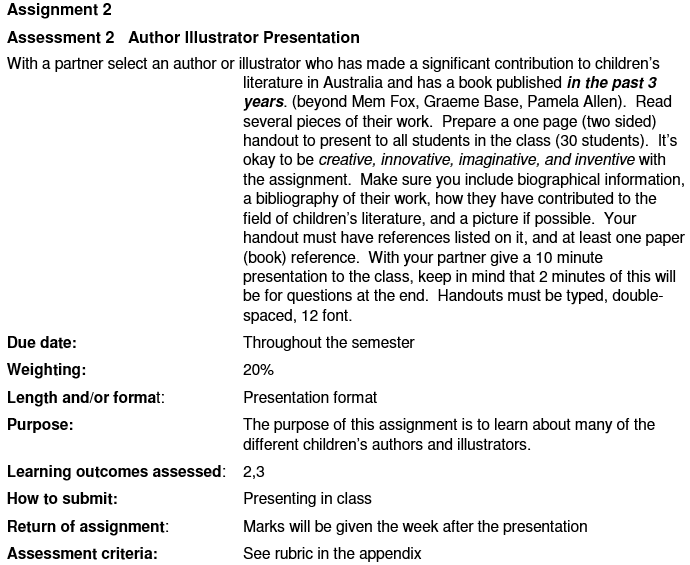
For this assignment, I had to create a presentation on an Australian  children's author. My partner and I chose to focus on Mr. Paul Jennings. The assignment description doesn't give away much but we approached the task enthusiastically.


With an assignment like this, we saw a lot of Powerpoint presentations. Not that these weren't great, but these sort of presentations got repetitive and seemed to follow the same format. Times this feeling by about 15, one for each group, and this lead to a lot of people in the tutorial fidgeting and quickly losing interest. 

We also saw a Prezi. This type of presentation was definitely a breathe of fresh of air and the girls responsible did a lovely job presenting. But my partner and I still wanted to try something a little different and out of the ordinary.

So, in the end we came up with this...


Above is a hyper-link to the website we created. We decided to compile an interactive website containing of all the information we needed to display plus some interesting extras, such as an animation, books reviews and some videos.

Taking this approach allowed us to be more flexible in the order we presented plus the different types of media meant that it wasn't always us talking which hopefully kept the class awake and interested!

We decided to stick to the more traditional format for our handout and in the end, it looked very much like the one you can see here.

I was extremely happy with the final product, how it looked and how the class responded to it, and by the look of our final mark, as was our tutor!  

What do you think of our assignment?

Have a question about wix.com and its features?

Thinking of using this idea for your next presentation?

Leave a comment below and feel free to share this post and follow the LMST blog!

Miss Tracy xx 


Thursday, 11 July 2013

Semester 1 Grades

So excited everyone! My semester 1 grades were emailed to me today and it looks like my hard work paid off...


And with a Grade Point Average (GPA) of 5.50, I was extremely happy to receive these grades. Now, it's all about getting organised and ready to do it all over again.

Semester 2 here we come! 

Miss Tracy xx